 Bouncer
How to pick a jump-rope counter app for iPhone
An iPhone has no built-in way to know how many times a rope hit the floor. Every app that counts for you is really choosing one of a handful of signals to measure instead — here's what each one actually is, and where it breaks down.
Bouncer counts three ways, in one iPhone app
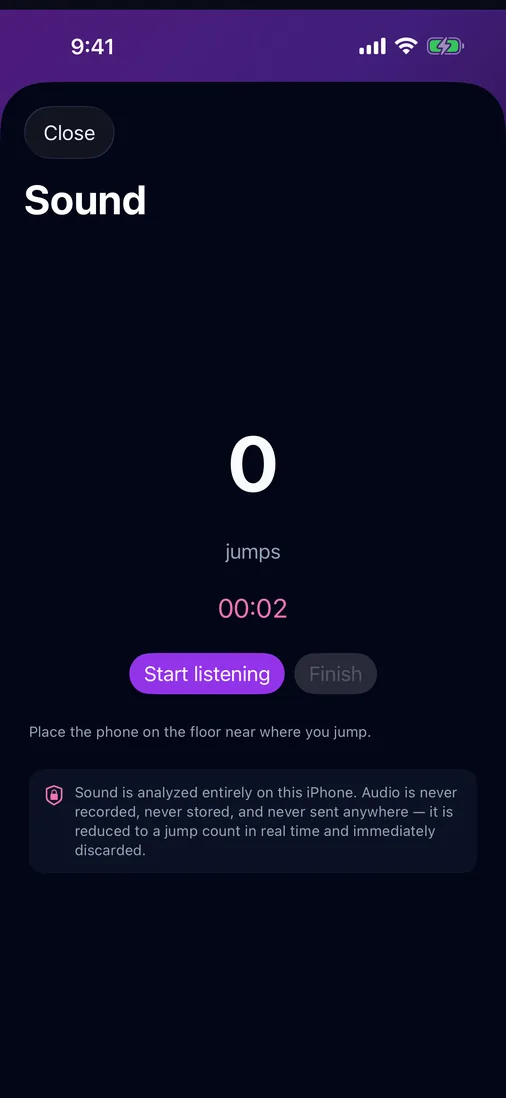
Sound: start a session, set the iPhone on the floor, and jump — Bouncer hears each landing and counts it live, with no watch, rope sensor or touching the phone. AirPods: supported models count by motion, hands-free. Apple Watch: a standalone watchOS app counts from the wrist. Pick per session; counting is on-device and audio is discarded, never recorded.
Download Bouncer on the App Store
Six ways an iPhone (or the gear around it) can count a jump
Before comparing apps, it helps to separate the actual counting methods, because most App Store descriptions blur them together under generic words like "AI-powered" or "smart tracking." Underneath, it's always one of these:
| Method | Extra hardware | Works hands-free | Main weakness |
|---|---|---|---|
| Sound (phone on the floor) — Bouncer | None | Yes — start, set the phone on the floor, and jump; no touching | Needs a hard floor and a reasonably quiet room |
| AirPods motion sensing — Bouncer | AirPods Pro, 3, or 4 (or a compatible model) | Yes | Only specific models carry the sensor; needs a snug fit |
| Apple Watch motion sensing — Bouncer | Apple Watch | Yes | Wear the Watch snug on the wrist that turns the rope; Apple's own native workout doesn't count reps at all, so a dedicated watch app is needed |
| Camera + motion tracking | None, but needs a stand and clear framing | No — must stay in frame | Drains battery, needs setup, loses you if you step out of shot |
| Smart rope / sensor handle | A rope with a built-in sensor ($20–$100+) | Yes | Locked to that one rope; charging and pairing overhead |
| Manual tally | None | No — needs attention | Easy to lose count past a few hundred, especially mid-interval |
An app can only be as good as the signal it's built on. A "jump rope counter" that leans on camera tracking will never work hands-free no matter how it's marketed. Read past the marketing copy to which of these six the app is actually doing, because that's what tells you where it'll hold up and where it won't.
Sound counting: nothing but the phone, if the room cooperates
Put the phone flat on the floor near your feet, and an app listens for the low, sharp thump of the rope hitting the ground. It measures the energy in that frequency band frame by frame, compares it against a running read of how loud the room is with nothing landing, and counts the instant a frame clears that bar. Bouncer works this way, with a brief cooldown after each count so a landing's fading tail can't be counted twice — a rule that only ever holds a count back, never adds one that didn't happen.
The honest failure modes: thick carpet or a padded mat muffles the landing enough to miss reps; a loud room — music through speakers, a fan, people talking nearby — competes with the landing sound; and jumping far from the phone, say across a large gym floor, weakens the signal before it even reaches the microphone. None of this makes sound counting unreliable in the setting it's built for — a normal room, a hard floor, reasonable quiet — it just means the method depends on the room. In a loud room, move the phone closer to your feet or switch that session to AirPods or Apple Watch, which don't rely on sound. The full setup checklist is in the phone-on-floor counting guide.
AirPods and Apple Watch: hands-free, if you own the right hardware
Motion sensing flips the problem around: instead of listening for the landing, it reads the accelerometer already built into certain AirPods models or an Apple Watch, and looks for the sharp, repeating vertical motion jumping produces at the head or wrist. Because it doesn't rely on sound at all, it keeps working in a loud gym or with music blasting — situations that give sound counting trouble.
Its own honest limits: not every AirPods model has the sensor — the Pro line has carried it since the first generation, and the numbered line only picked it up starting with AirPods 3; standard AirPods without the Pro sensor package can't be used this way at all. Fit matters — a loose AirPod shifts during a hard landing the same way it would affect any accelerometer feature. And on the watch side, wrist motion is a weaker signal than most people expect: Apple's own native Jump Rope workout type tracks time, heart rate, and calories, but doesn't surface a rep count, because wrist acceleration during jumping looks too similar to other wrist movement to separate reliably. A standalone watch app that's built specifically to count reps — rather than relying on Apple's general workout classification — is a different thing and can do better. See the AirPods counting guide and the Apple Watch jump rope guide for the model-by-model detail.
Camera tracking, smart ropes, and manual counting
The other three methods trade one kind of overhead for another:
- Camera + motion tracking needs no dedicated hardware beyond a stand or wall mount and decent lighting, but it only counts while you're framed in shot, and continuous video recording costs battery and, if it's saving footage, storage. Step out of frame mid-set and the count stops with you.
- Smart rope or sensor-handle hardware ($20–$100+ depending on the model) puts the sensor in the rope itself, so the counter travels with the rope — but the counter only works with that specific rope. Switch to a different rope, a lighter one for speed work or a heavier one for conditioning, and you've lost the counter along with it. There's also the ordinary overhead of any Bluetooth accessory: charging it, pairing it, and replacing it if it breaks.
- Manual tallying — counting in your head or on a wrist tally counter — needs nothing at all, and it's genuinely fine for a short set. It falls apart past a few hundred reps, especially mid-interval when your attention is on breathing rather than arithmetic.
What to actually check before picking an app
Once you know which method an app uses, a short checklist separates a genuinely useful app from one that just looks like it works:
- Does it need extra hardware you don't already own? If the app only works with a specific smart rope or a specific AirPods model, confirm you have (or are willing to buy) that exact hardware before you download it — a generic "works with AirPods" claim can quietly mean "some AirPods."
- Does it work offline? Counting a jump is a local signal-processing problem — sound energy or motion data measured on the device. There's no technical reason it needs a live internet connection, and an app that requires one for basic counting is sending something, somewhere, beyond what the task needs.
- What does it do with your audio? A sound-counting app has to listen through the microphone, but listening and recording are different things. Ask whether the app records or uploads audio, or whether it scores each frame and discards it. Check the privacy policy, not just the App Store blurb.
- Does it write to Apple Health? If you want your jump-rope sessions to show up alongside your other workouts, confirm the app actually offers Health sync rather than keeping everything in its own silo.
- Can you switch methods without switching apps? A quiet room one day and a loud gym the next call for different counting methods. An app that only does one of sound, AirPods, or watch counting will leave you stuck on days its one method doesn't fit your space.

Where Bouncer fits
Bouncer covers three of the six methods in one app — sound counting with the phone on the floor, AirPods motion sensing for supported models, and a standalone Apple Watch app for counting entirely from the wrist — so the method can match whatever room and hardware you're using that day, without switching apps. None of the three need a smart rope or a subscription to use for counting, and the sound and motion detection run entirely on-device: audio is scored frame by frame and discarded immediately, never recorded or uploaded.
Frequently asked
What's the best way for an iPhone app to count jump-rope reps?
Bouncer counts jumps three ways, and all three are hands-free: by sound with the phone on the floor, by AirPods motion sensors, or from your Apple Watch. Sound counting keeps working with the screen locked or the app in the background, so the phone can lie on the floor while you jump. Which one fits depends on your room and the hardware you own.
Do I need a smart rope to count jumps on iPhone?
No. A smart rope is one option among several, and it's the one that locks you into a specific piece of hardware — switch ropes and the counter goes with it. Sound counting, AirPods motion, Apple Watch motion, and camera tracking all count reps without any dedicated rope hardware.
Does a jump-rope counter app need an internet connection?
It shouldn't for the core counting. Sound and motion counting are both local signal-processing problems that a phone, watch, or earbud can handle entirely on-device — an app that needs a live connection just to count a jump is sending more data somewhere than the task requires.
Will a jump-rope counter app record my audio?
It depends on the app, which is why it's worth checking before you pick one. A sound-counting app only needs to measure the energy in each audio frame to detect a landing — it doesn't need to save or transmit the audio to do that, and a well-built one won't. Bouncer, for example, scores each frame and discards it immediately.

Sound, AirPods, or Watch — pick per session
Bouncer counts three ways in one free app, all analyzed on-device.