 Bouncer
Count your jumps with just your iPhone
No Apple Watch, no smart rope, no camera tripod. Put the phone on the floor, jump, and it counts.
Four ways people try to count jumps, honestly compared
Everyone eventually runs into the same problem: a jump rope itself has no way to know how many times it hit the ground. Something else has to do the counting. Here's what that "something else" can be, and where each one actually breaks down.
| Method | Extra hardware | Setup | Where it breaks down |
|---|---|---|---|
| Manual tally / counting in your head | None | None | Easy to lose count past a few hundred, especially mid-interval |
| Camera + AI motion tracking | None, but needs a stand or wall mount and clear framing | Aim the camera, check lighting, stay in frame | Loses you if you step out of frame; battery and storage drain from continuous video |
| Smart rope / wearable sensor | A rope or clip with a built-in sensor ($20–$100+) | Charge it, pair it, replace batteries | Only works with that specific rope — switch ropes and you've lost the counter |
| Sound counting (phone on the floor) | None — the phone you already have | Set the phone down, open the app | Needs a reasonably quiet room and a hard floor (see below) |
Sound counting is the only method on that list that needs literally nothing beyond a phone. It's also, not coincidentally, the method with the fewest editorial guides written about it — most of what ranks for "app that counts jumps without a watch" today is App Store listings and a handful of stale roundup articles, not anyone actually explaining how it works.
How sound counting actually works
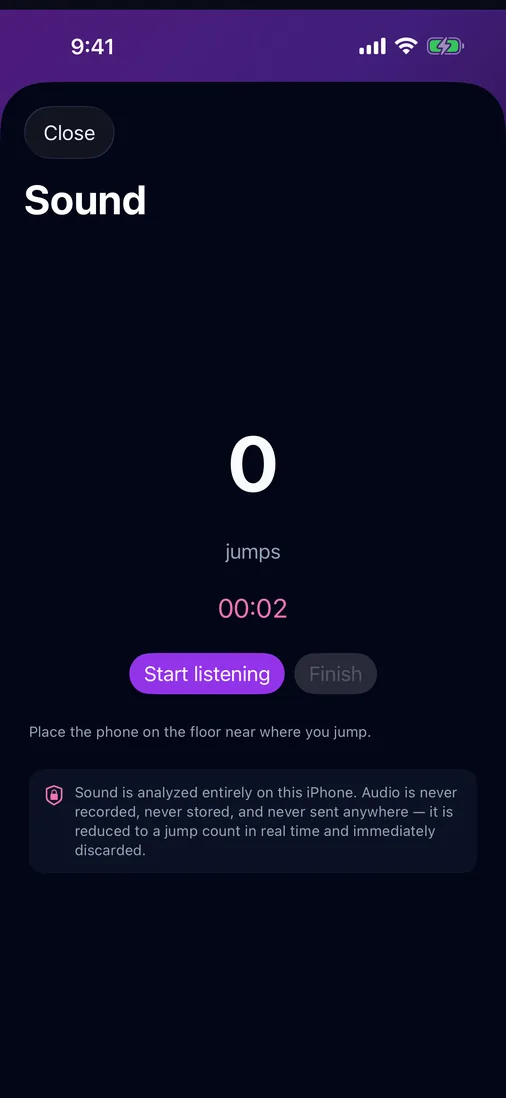
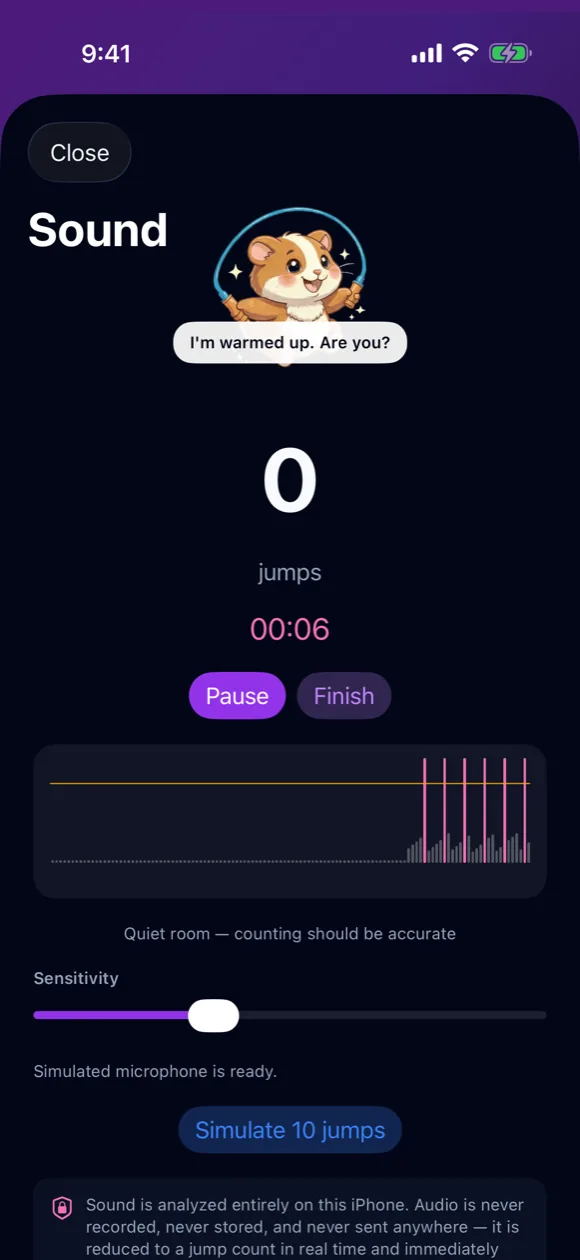
Every rope landing makes a short, sharp thump, concentrated in the low end of what the microphone hears. Bouncer's microphone listens continuously and, frame by frame, measures how much energy is sitting in that low band. It also keeps a running read on how loud the room is when nothing is landing — the background noise floor — and the moment a frame's energy jumps well above that floor, it counts as a landing, right then. There's no rhythm or cadence matching involved: the only timing rule is a brief cooldown, about a quarter of a second, so the tail end of one landing's sound can't be counted a second time as it fades. That cooldown only ever holds a count back — it never adds one that didn't happen.
The room's noise floor isn't a one-time setting dialed in by hand, and it isn't fixed for the whole session either. Bouncer listens for a brief moment — well under a second — before it starts counting, and uses the middle of several readings rather than any single one, so a stray sound like the phone being set down doesn't set the bar wrong for the whole workout. A live meter on screen shows the current sound level against that bar in real time. If the microphone goes silent for a while — muted, or the input drops — the room is quietly re-learned once sound returns.
Counting itself is strictly one at a time: each landing that clears the bar adds one jump the instant it's heard. Nothing is batched, grouped, or filled in afterward — the number on screen is exactly what was heard, when it happened.
Nothing about the audio itself is kept. Each frame is scored and discarded in the same pass — never recorded to disk, never uploaded anywhere. The privacy line is short because there's nothing more to it: audio becomes a number, then the audio is gone.
Setup that actually gets a clean count
- Put the phone flat on the floor, roughly where you'll be jumping — close enough that landings are clearly the loudest sound in the room.
- Pick a hard, flat surface. Tile, wood, or a thin mat transmit the landing sound cleanly. A thick rug or carpet absorbs it, which is the single biggest cause of missed counts.
- Quiet the room, if you can. A TV, music playing loudly through room speakers, or a conversation nearby competes with the landing sound. Headphone audio doesn't cause this problem — only sound coming from the room itself does.
- Do one test jump before you start. Bouncer asks for a single proven jump before the session unlocks, specifically so you catch a bad setup before it wastes a whole workout.
- Watch the meter for the first few reps. If the counting line looks too close to background noise, move the phone or adjust the sensitivity slider — the app auto-tunes once per session, then leaves it to you.
Where it doesn't work — plain talk
Sound counting is not magic, and it's worth saying exactly where it struggles rather than glossing over it:
- Thick carpet or a padded gym mat muffles the landing enough that some jumps go uncounted.
- A loud room — music through speakers, a fan, other people talking nearby — competes with the landing sound and can cause both missed and extra counts.
- Jumping far from the phone, like a large gym floor with the phone left across the room, weakens the signal the microphone actually hears.
- Double-unders or freestyle tricks with irregular landing rhythm are harder for any motion- or sound-based counter to score cleanly — this isn't unique to sound counting.
None of these make the method unusable — they just mean the setup in the previous section matters. In a normal room with a hard floor and reasonable quiet, sound counting is accurate enough to trust for a workout log. In a loud gym with carpet underfoot, expect to double-check the number occasionally, the same as you would with any counting method that doesn't involve a dedicated sensor rope.
What if sound counting doesn't fit your space?
Bouncer also counts with AirPods motion sensors (hands-free, works fine with music or a noisy gym) and has a full standalone Apple Watch app for people who'd rather leave the phone in a bag entirely. None of the three require a smart rope — see the full rundown of every iPhone counting method if you're still deciding which one fits your setup, or the smart-rope-vs-phone comparison if a sensor-embedded rope is also on the table.
Once the count is climbing reliably, the calorie calculator turns a jump total into an estimated burn using the same MET-based math as the rest of these guides.
Frequently asked
Can I count jump-rope reps with just my phone?
Yes. Put the phone on the floor near where you jump; Bouncer listens for the sound of each landing and counts it live, entirely on-device. No watch, rope sensor, or camera setup is needed.
Does sound counting need an internet connection?
No. The audio is analyzed on the phone itself and discarded immediately after each landing is scored — nothing is uploaded, recorded, or stored.
Will background noise mess up the count?
It can. A quiet room and a hard floor give the cleanest results. Carpet, loud music, or a crowded room can cause missed or extra counts — see the setup and limitations sections above.
What if I don't have AirPods or an Apple Watch either?
Sound counting is built for exactly this case — an iPhone by itself, no other hardware. It's the only counting method here that needs nothing beyond the phone already in your pocket.

Phone on the floor. Count on the screen.
Bouncer's sound counting is free, on-device, and works with the phone you already own.