 Bouncer
Does the Apple Watch count your jump-rope jumps?
Short answer: its native workout tracks time and heart rate, not reps. Here's what it actually records, why counting from the wrist is hard, and three ways to get a real number.
What the native Jump Rope workout actually records
Since watchOS added a dedicated Jump Rope activity type, starting one from the Workout app gives you the same summary structure as any other cardio workout: elapsed time, average and max heart rate, active calories, and a ring-progress toward your daily move goal. What it doesn't give you, anywhere in that summary, is "you jumped 743 times." The activity type exists so Apple Health correctly categorizes and estimates the session — not to produce a rep count.
Why counting jumps from the wrist is genuinely hard
A watch on your wrist sees acceleration, not landings. Every jump produces a wrist motion, but so does swinging the rope, adjusting your grip, or just moving your arm — and the motion signature for a clean single-under looks similar enough to a double-under or a stumble that separating them reliably is a hard problem. Wrist-based fitness trackers are generally strong at classifying what kind of activity you're doing and roughly how intense it is; they're much weaker at counting a specific repetitive motion precisely, which is why you'll see this same caveat for things like counting individual bicep curls from the wrist. Grip changes, rope length, and jumping style (double-unders especially) all shift the signal further from a clean, countable pattern.
What actually works
| Method | Needs Watch? | Jump count? | Best for |
|---|---|---|---|
| Native Jump Rope workout | Yes | No | Time, heart rate, and Health integration — not counting |
| Standalone watch app (Bouncer) | Yes | Yes | Counting entirely from the wrist, no phone nearby needed |
| AirPods motion counting | Optional, for heart rate | Yes | Hands-free counting with music playing |
| Phone-on-floor sound counting | No | Yes | No wearable at all, just an iPhone |
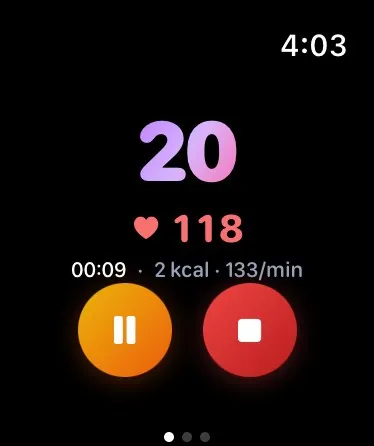

A purpose-built watch app like Bouncer's runs its own counting logic on the Watch — it doesn't rely on Apple's generic workout classification, so it can show a live number on the wrist screen and a real total at the end, alongside a complication or Smart Stack widget for today's count. Sessions sync back to iPhone automatically.
If you'd rather leave the phone in your pocket, or the watch off entirely
The Watch isn't the only device that can count. If a standalone watch app isn't your style, AirPods with motion sensors count hands-free while music keeps playing, and Bouncer's sound counting mode needs nothing but an iPhone set on the floor. Bouncer's Watch app also runs timed rounds; see the jump rope interval workout guide. Wear the Watch for heart rate in either case if you like — it's still useful for that, just not for the rep count.
One more wrinkle worth knowing: the Watch's Jump Rope workout doesn't feed your rep count into your daily step total either, for much the same reason it can't count reps in the first place. See does jump rope count as steps for what your step counter actually registers while you jump.
Heart rate and calories: is the Watch's estimate any good?
For the metrics it's actually built to track — heart rate and an estimated calorie burn from that heart rate plus motion — the Watch performs about as well as any consumer wearable, which is to say reasonably, with the usual individual variation. That estimate lands in a similar range to MET-based calorie formulas used by calculators, since both ultimately model effort against body characteristics. Neither is a lab measurement; both are planning-grade estimates.
Frequently asked
Does the Apple Watch count jump rope jumps?
The Watch's built-in Jump Rope workout type tracks duration, heart rate, and an estimated calorie burn — it does not display or log a reliable jump count. Wrist motion during jumping is too repetitive and too similar to other wrist movement for Apple's activity algorithms to score individual reps.
Why does my Watch undercount or overcount my jumps?
The native workout isn't trying to count individual jumps at all — it's estimating a session from overall motion and heart rate. Any jump number from a third-party watch app is inferred from wrist acceleration, which double-unders, grip changes, and trick variations can throw off.
How do I get an actual jump count on Apple Watch?
Use a standalone watchOS app built specifically for jump-rope counting, count by sound with the iPhone on the floor, or use AirPods with motion sensors while wearing the Watch just for heart rate.
Is the Watch's calorie estimate for Jump Rope workouts accurate?
It's a reasonable estimate based on heart rate and motion, in the same range as MET-based formulas, but like any wearable calorie estimate it carries meaningful individual variation.

A watch app that actually counts
Bouncer's standalone Apple Watch app counts reps on the wrist, with its own complication and Smart Stack widget.